Turn Job Site Photos into Xactimate Estimates in Minutes.

Walk the loss, shoot your photos, upload. R360 Scope writes the scope and hands you a carrier-ready ESX file that opens natively in Xactimate — no plugins, no retyping, no late nights.

Trusted by restoration teams across the country
Northline Restoration. Beacon Mitigation. Cornerstone Restoration. RapidDry Co. Summit Property Restoration. HarborView Claims. RedOak Builders. TrueScope Adjusting. Northline Restoration. Beacon Mitigation. Cornerstone Restoration. RapidDry Co. Summit Property Restoration. HarborView Claims. RedOak Builders. TrueScope Adjusting.
The Platform

What our technology can do.

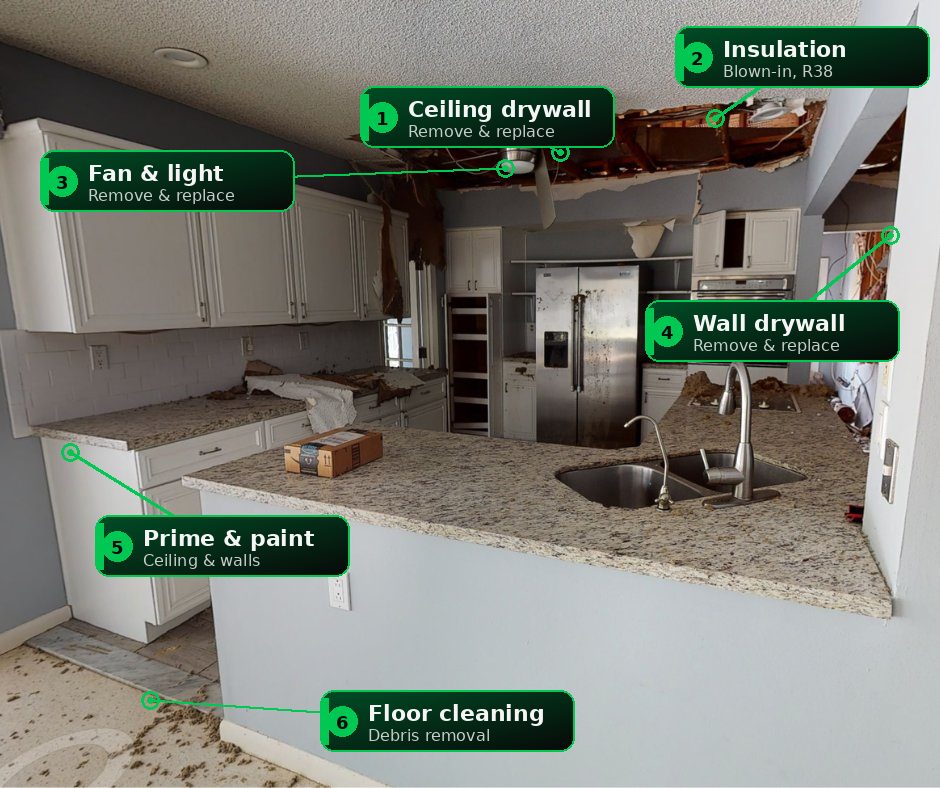
A damaged kitchen with AI scope-detection callouts on drywall, insulation, paint and cleanup

It reads the room for you

Upload the photos your crew already takes — R360 Scope flags every item to remove, replace, and restore, and hands back a carrier-ready ESX.

Run a photo estimate
★★★★★
"The first time we opened one of these ESX files in Xactimate and it just… worked, the room went quiet. What took my senior estimator an afternoon now takes the new guy fifteen minutes."
Marcus DevlinOperations Manager, Lone Star Restoration Group — Fort Worth, TX
★★★★★
"We ran our last twelve water jobs through it. The scope it writes is closer to my senior estimator's than my junior's — and it's done before the truck leaves the driveway."
Tara WhitfieldProject Manager, Gulfstream Water & Fire — Tampa, FL
★★★★★
"The compare tool paid for itself on a single claim. It flagged the items the carrier's estimate had stripped, line by line, and we got them back on the supplement."
Dan RussoOwner, Buckeye Restoration Partners — Columbus, OH
★★★★★
"I shot the house with the 360 camera we already owned. The sketch was sitting in Xactimate before I finished walking the exterior. That part still feels like a trick."
Kyle BrennerLead Estimator, Front Range Storm Response — Denver, CO
How It Works

Shoot. Upload. Estimate.

No new hardware, no workflow to relearn. R360 Scope slots into the way your crews already document a loss and hands the estimate back before the day is over. Three steps, start to finish.

1 Shoot
Job-site photos of the loss

The photos you already take

Any phone, or a 360° panorama. No app, no rig, no retraining.

2 Upload
18 ft 4 in 11 ft

Rooms & measurements

Your dimensions, or measured from a 360° scan — quantities by IICRC S500.

3 Estimate
scope.esxnative
Drywall — R&R128 SF
Insulation — remove96 SF
Paint — 2 coats128 SF
Total scope$1,572

A native ESX, same day

Scope, F9 notes, and sketch in one file — opens straight in Xactimate.

Same-day turnaround You own every line One native ESX file
About R360 Scope

Built by restoration people, for restoration people.

We run restoration operations ourselves — so we built the tool we wished we had. AI absorbs the tedious work; the judgment stays with your estimators.

R360 Scope handles Automated
  • Line-item hunting
  • Sketching the room
  • Typing the scope
You own Always yours
  • Measurements & pricing
  • Every quantity, by IICRC S500
  • Final review & sign-off
15,000+real Xactimate line items behind every scope
Minutesfrom job site photos to a native ESX
100%estimator-reviewed before it's sent
From the Blog

Field notes on estimating, supplements & AI.

All articles
Free Download

See a real AI-written estimate before you trust one.

Get a sample ESX written entirely from job site photos, plus the comparison report that goes with it — so you can open it in Xactimate and judge the scope yourself.

One email with the files. No drip campaign, no sales calls.
✓ On its way — check your inbox in the next few minutes.
FAQ

Straight answers, no demo call required.

Does the ESX file really open in Xactimate?

Yes — natively. R360 Scope writes structurally valid ESX files that open in Xactimate like any estimate you built by hand: scope, notes, and sketch included. No plugins, converters, or import steps.

Who controls quantities and pricing?

You do, permanently. Quantities come from the room measurements you enter, run through deterministic IICRC-based formulas. Pricing comes from your price list inside Xactimate. The AI proposes scope — it never invents a number.

What photos do I need to take?

The same documentation photos you already take on every loss — wide shots of each affected room plus closeups of damage. For Sketch generation, add 360 panoramas from any consumer 360 camera.

How do comparative reports work?

Upload two estimates — typically yours and the adjuster's. You get a line-by-line comparison showing scope differences, quantity gaps, and total impact, plus an exportable ESX of the reconciled estimate.

Will this replace my estimators?

No — it replaces their data entry. Every estimate is reviewed and owned by your estimator in Xactimate before it goes anywhere. The win is that your most experienced people spend their time on judgment, not typing.

What does it cost to try?

Your first run on each tool is free — one photo estimate, one comparison, one 360 sketch. After that, pay per estimate or pick a team plan. No contract required to start.

Contact Us

Talk to a real estimator.

Questions about how R360 Scope fits your shop, pricing for your volume, or want a live walkthrough? Send a note and a real person — who has written plenty of estimates — gets back to you, usually the same day.

We'll never share your details. No spam, ever.

Thanks — your message is in. We'll be in touch shortly.

Your next estimate could take ten minutes.

Upload the photos from your last job and see the ESX for yourself. The first one is on us.

Get Started