How It Works

Photos in. A carrier-ready ESX the same day.

No new hardware, no workflow to relearn. R360 Scope slots into the way your crews already document a loss and hands the estimate back before the day is over — three steps, start to finish.
The workflow

Shoot. Upload. Estimate.

1 Shoot
Job-site photos of the loss

The photos you already take

Any phone, or a 360° panorama. No app, no rig, no retraining.

2 Upload
18 ft 4 in 11 ft

Rooms & measurements

Your dimensions, or measured from a 360° scan — quantities by IICRC S500.

3 Estimate
scope.esxnative
Drywall — R&R128 SF
Insulation — remove96 SF
Paint — 2 coats128 SF
Total scope$1,572

A native ESX, same day

Scope, F9 notes, and sketch in one file — opens straight in Xactimate.

Same-day turnaround You own every line One native ESX file
The Platform

Four tools, one carrier-ready ESX.

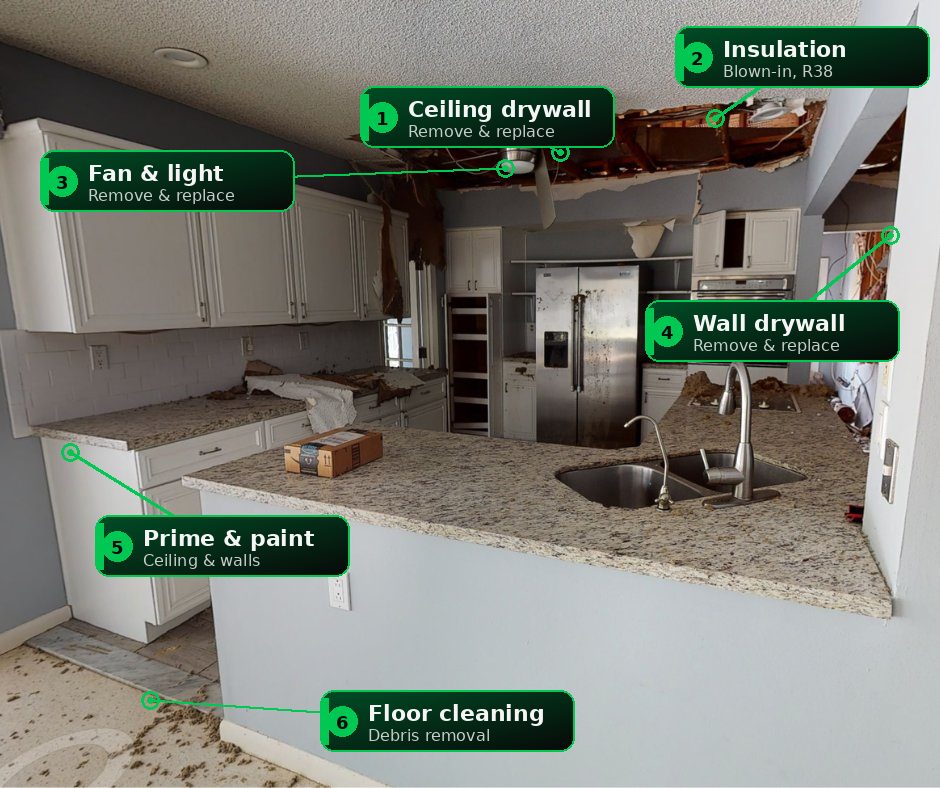
AI scope detection reads a damaged kitchen
Photo → Estimate

It reads the room for you

Upload the photos your crew already takes. R360 Scope flags every item to remove, replace, and restore — then returns a complete, carrier-ready estimate as a native ESX file.

  • AI scope detection grounded in 15,000+ real Xactimate line items
  • Works from standard job-site photos — any phone
  • ESX opens directly in Xactimate, no import gymnastics
CARRIER.PDF
ESX · line itemseditable
Drywall — R&R128 SF
Insulation — remove96 SF
Paint — seal & 2 coats128 SF
Total scope$1,572
PDF → ESX

Any PDF, rebuilt as editable ESX

Already have an estimate as a PDF? Drop it in and get back a structurally valid ESX — every line item reconstructed as real, editable Xactimate data you can supplement like you built it by hand.

  • Turn any carrier or third-party PDF into a working ESX
  • Line items, quantities, and totals reconstructed faithfully
  • Hover a row to see the rebuilt, editable data
18 ft 4 in 11 ft 2 in Ceiling 8 ft 0 in · 204 SF floor · 102 SF ceiling
360° → Sketch

Measurements from a 360° photo

Walk the loss once with any 360° camera. R360 Scope reads wall lengths, ceiling height, and floor area off the panorama and drops a dimensioned room into your Xactimate Sketch — hover a dimension to highlight it.

  • Wall, floor, and ceiling quantities measured from the panorama
  • Rooms drop into a native Xactimate Sketch, fully dimensioned
  • Quantities still flow through deterministic IICRC S500 formulas
Line itemYoursCarrier
Water extraction3 rm3 rm
Drywall ½" — R&R128 SFrepair
F9Replace, not repair — water line > 24" per IICRC S500. Carrier scoped repair only; 48 SF underscoped.
Air movers — 3 days42
F9Dry standard: 4 air movers for 204 SF Class 2 per IICRC S500. Carrier allowed 2.
Antimicrobial204 SF204 SF
Detach & reset trim48 LF48 LF
Comparative + F9

See every difference — with the note to back it

Line up your estimate against the carrier's and see exactly where they diverge. Hover any flagged line and the F9 note that justifies it slides out, ready to drop straight into Xactimate.

  • Line-by-line diff of scope, quantities, and totals
  • Auto-written F9 notes cite the IICRC S500 reason for each line
  • Export the reconciled result as a clean ESX file
Why estimators trust it

Built to fit your crews — and your judgment.

Minutes, not days

Most jobs come back the same day they're shot — often before the crew has left the site. No queue, no overnight wait.

You stay in control

Quantities come from your measurements and deterministic IICRC formulas, never a model's guess. Your estimator reviews and owns every line.

One file, native

Scope, notes, and sketch travel together in a single ESX that opens in Xactimate with no plugins or imports.

Get Started

Run your first estimate free.

Upload the photos from your last job and see the ESX for yourself. The first one is on us.

Get Started
Book a Demo

See it run on your own job.

Grab 30 minutes with a real estimator. Bring photos from a recent loss and watch R360 Scope turn them into a carrier-ready ESX, live — your questions answered in real time.